How to Restore a Multi-Agent Terminal Workspace on macOS
Restore a multi-agent terminal workspace on macOS by saving layout and agent resume metadata; cmux 0.64.15+, hooks, Login Item, no-arg launch.
How do you restore a multi-agent terminal workspace on macOS after reboot?
Restoring a multi-agent terminal workspace on macOS requires two things the app must save separately: the window layout and each agent's resume metadata. Reopening panes is easy; reattaching to the prior agent conversations is the hard part. DEBEDb documents that with cmux 0.64.15 or newer, autoResumeAgentSessions: true, cmux hooks setup, and a Login Item relaunch, 15 of 15 agent panes resumed on their real prior conversations after reboot.
The chain looks like this. First the app persists workspace state — windows, workspaces, panes, working directories, and scrollback. cmux states that this state survives a full computer restart. But layout alone leaves you staring at empty shells sitting in the right folders. The second half is per-agent resume: hooks record enough about each session that the app can relaunch the agent on the exact conversation it was mid-way through.
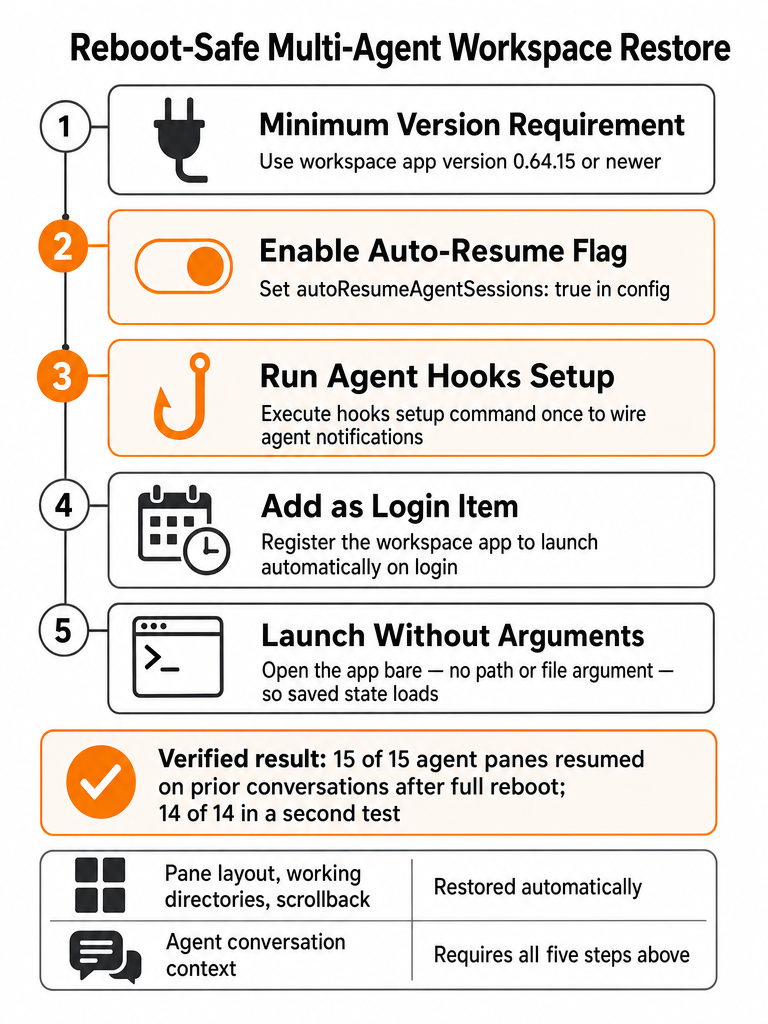
DEBEDb's reboot test on macOS 15 and Apple Silicon spells out the operational sequence. Set autoResumeAgentSessions: true in config. Run cmux hooks setup once so agents write resume metadata. Add cmux as a macOS Login Item so it auto-launches after reboot. Launch it with no arguments — passing a directory or command can override the saved-state restore path.
In a later confirmation, DEBEDb reported 14 of 14 agent panes resumed after auto-launch, even with ordinary macOS window restore turned off. That last detail matters: the resume worked independently of System Settings' "reopen windows" behavior, because the app owns its own state.
Try it yourself — Download CodeGrid for macOS.
Workspace restore vs agent resume: what actually comes back?
Workspace restore and agent resume are two different guarantees, and confusing them is where people lose work. Restore brings back the container: windows, workspaces, panes, working directories, and terminal scrollback. Resume brings back the conversation: the agent picks up the prior session instead of starting cold. cmux says it restores the former across relaunch and full restart; DEBEDb shows the latter needs explicit hooks and a config flag.
| Comes back | What it means | What enables it |
|---|---|---|
| Windows & workspaces | Your window/workspace grouping reappears | App-level session restore (cmux) |
| Panes & layout | Each pane returns in its position | Saved workspace state |
| Working directories | Every pane reopens in its prior cwd | Saved directory metadata |
| Scrollback | Prior terminal output is still readable | Auto-saved scrollback (cmux) |
| Agent conversation | The agent resumes the prior session | autoResumeAgentSessions + cmux hooks setup (DEBEDb) |
The explainx write-up frames cmux session restore as auto-saving and restoring "workspace layouts, directories, scrollback, and agent sessions." That's the full stack when configured. Without the hooks half, you can still get a perfect layout — same panes, same folders, same scrollback — while every agent starts fresh. Layout restore is the easy part; agent-conversation resume is the feature that actually saves your context.
For triaging which panes came back correctly versus which need a manual relaunch, keeping every session visible on one surface helps — the same reason a 2D canvas beats stacked terminal tabs for dense multi-agent work.
What minimum setup makes terminal workspace resume reliable?
The minimum reliable resume setup is five concrete steps, documented by DEBEDb on macOS 15 and Apple Silicon. Skip any one and you tend to get layout without conversation, or nothing at all after a hard restart. The version floor matters: reboot resume started working for the author on cmux 0.64.15, and the notes recommend using that version or newer.
Run these in order:
- Confirm the version. Use cmux 0.64.15 or later. Earlier builds didn't reliably resume agent panes after reboot.
- Set the config flag. Add
autoResumeAgentSessions: trueso the app knows to reattach agents, not just reopen shells. - Install the hooks once. Run
cmux hooks setup. Hooks are what let each agent write the resume metadata the app reads on restart. - Add a Login Item. Register cmux as a macOS Login Item so it relaunches automatically after a reboot instead of waiting for you to open it.
- Launch with no arguments. Auto-launch cmux bare. Passing a directory or command can short-circuit the saved-state restore.
How do I set up a terminal workspace to work with my existing AI agent?
A terminal workspace integrates with an existing AI agent through the shell, not around it: the workspace runs the agent inside a PTY-backed pane and adds hooks, CLI automation, and notifications on top. You keep running Claude, Codex, Gemini, or any shell-based agent exactly as you do today. cmux, for example, reads your existing ~/.config/ghostty/config for themes, fonts, and colors, so your terminal setup carries over unchanged.
The integration points that matter for a multi-agent workflow:
- PTYs — each agent runs in its own pseudo-terminal, so the workspace never intercepts or rewrites the agent's I/O.
- Hooks —
cmux hooks setupwires agents to write resume metadata and fire status events, which is what makes reboot resume work. - CLI and socket API — the explainx write-up notes cmux exposes a full CLI and socket API to automate workspaces, splits, keystrokes, and browser panes.
- Notifications — cmux says notifications can fire automatically through terminal escape sequences (OSC 9/99/777) or through the cmux CLI and agent hooks.
That last point solves the missed-prompt problem directly: when an agent needs input, the pane can signal you without you polling every terminal.
Setup is additive. You install the workspace, point it at your repos, run the hooks command once, and your existing agents keep working — now with resume, status awareness, and scripting available. For catching approval prompts specifically, pair this with Notification and Stop hooks so you never miss an agent request.
Can I use existing AI agents with any terminal workspace?
Any terminal can run any shell-based AI agent — but only some workspaces do agent-aware restore. The distinction is between reopening a shell and reattaching to a conversation. A generic terminal that reopens your panes after restart still leaves every agent cold, because it saved the window, not the session. Agent-aware resume needs workspace state plus per-agent resume support, which cmux implements through autoResumeAgentSessions and cmux hooks setup.
Put plainly: nearly any terminal can run an agent, but restoring an agent's prior conversation is a much narrower capability.
| Capability | Generic terminal | Agent-aware workspace |
|---|---|---|
| Run a shell-based agent | Yes | Yes |
| Reopen panes after restart | Sometimes (OS window restore) | Yes (app-owned state) |
| Restore working directories | Rarely | Yes |
| Resume the prior agent conversation | No | Yes, with hooks + config flag |
The practical test is whether the tool saves resume metadata per agent, not whether it can launch one. Most agents — Claude Code, OpenAI Codex, Gemini, OpenCode — are shell-native, so they slot into any PTY-backed pane. What varies is whether the workspace can bring the conversation back, or just the empty prompt.
If you routinely run different agents against the same repos, keeping them side by side in one workspace makes the resume distinction obvious at a glance.
What is the best way to run multiple AI coding agents at once?
The safest way to run multiple AI coding agents at once is to make overlap impossible by design: spec-scoped tasks, one git worktree per agent, automated verification, and sequential merges. Augment Code's guide states that a multi-agent workspace is reliable only when agents work on isolated, spec-scoped tasks, because parallel edits to shared hotspot files create merge conflicts, duplicated features, and logic that compiles but disagrees at runtime.
The discipline maps to restore directly. Resumed sessions are only trustworthy if each one was scoped and isolated before the reboot — otherwise you resume 15 panes that were already stepping on each other.
The pattern Augment Code documents:
- Decompose into testable, spec-scoped tasks with explicit boundaries so agents don't guess at intent.
- Isolate each agent in its own git worktree so parallel edits can't collide on the same working tree.
- Require automated verification — tests and quality gates — before anything merges.
- Merge branches sequentially, not all at once, so conflicts surface one at a time.
Augment Code notes that running 2-4 AI coding agents in parallel can speed up investigation and implementation — the coordination is what keeps that speed from turning into cleanup. The explainx article frames the operator's real load at 5-10 concurrent Claude Code sessions across multiple projects, which is where visibility and worktree hygiene stop being optional. Scope and isolate before you rely on resume: a restored session inherits whatever mess it had at reboot, and worktree isolation keeps that mess contained to one branch. See the git worktree workflow for parallel agents.
Why stable paths matter when restoring sessions across multiple Macs
Path discipline is what keeps restored sessions and pasted prompts working when you move between Macs. Little Might's multi-Mac setup makes the point directly: keep the same folder structure, project names, shell setup, and home-relative paths on every machine so the workspace feels boringly identical everywhere. When paths match, a restored session's working directory resolves correctly no matter which Mac woke it up.
The specific fix is home-relative paths. Little Might recommends using ~/Developer/littlemight instead of an absolute /Users/... path, so commands and prompts work across Macs even when usernames differ. An absolute path baked into a prompt or a resume record breaks the moment it lands on a machine with a different home directory. Home-relative paths are the cheapest insurance against broken resumes — you change the username, keep the command.
Little Might's own setup standardizes three machines — a Mac Studio at home, a MacBook Pro for travel, and a headless Mac mini running agents — on the same ~/Developer/littlemight layout. The three computers are meant to "feel boringly similar," which is exactly what makes a resumed agent session portable.
This compounds with worktree hygiene. If each agent lives in a worktree under a stable, home-relative root, both restore and cross-machine sync stay predictable. Organizing worktrees on macOS around one canonical repo is the same discipline applied locally.
What should you check after a forced or hard reboot?
After a forced or hard reboot, verify two things in order: that panes and directories restored, and that each agent actually resumed its prior conversation. App relaunch success is not the same as agent resume success — the window can come back perfectly while an agent starts cold. DEBEDb's own testing separates these, reporting all agent panes resuming only after the full hooks-plus-config setup was in place.
Work through it methodically:
- Confirm the layout restored. Windows, workspaces, panes, and working directories should match your pre-reboot state.
- Check each pane's directory. A pane in the wrong
cwdwill make an agent resume against the wrong repo. - Verify each agent is on the prior conversation, not a fresh session. This is the resume half, and it's the one that silently fails.
- Manually reopen any failed session. DEBEDb notes a fallback manual reopen path — if a pane didn't resume, relaunch the agent yourself rather than assuming the whole restore failed.
The mental model that saves time: layout coming back tells you app restore worked; it tells you nothing about whether the agents reattached. Treat those as separate checks every time.
How do you confirm a terminal workspace supports agent-aware resume?
You confirm agent-aware resume with a small, deliberate reboot test — not by reading a feature list. Set up three or four panes running real agents in known directories, reboot, and inspect what actually comes back. The claim you're testing is narrow: does the tool restore the conversation, or only the container? DEBEDb's documented method proves resume by counting panes that returned to their real prior conversations, not panes that merely reopened.
Run this evaluation:
- Start a small set of panes — three to five agents in distinct repos, each mid-task so there's a conversation to resume.
- Reboot the Mac. A real restart, not just quitting the app, since that's the case that breaks generic terminals.
- Inspect working directories. Each pane should reopen in its prior
cwd. - Check scrollback. Prior output should still be readable — cmux lists scrollback among what it auto-saves.
- Look at status indicators and notifications. cmux uses notification rings and OSC-based signals; confirm they still reflect real agent state.
- Verify the conversation resumed. The decisive check — is each agent continuing the prior session, or starting from zero?
If step 6 fails while steps 3–5 pass, you have session persistence, not agent-aware resume. That gap is the whole point of the test.
A macOS terminal canvas worth adopting should pass all six — PTY-backed panes, session awareness, and true resume, not just window reopening.
Where restore fits with worktrees, branch review, and prompt triage
Restore is one link in a larger multi-agent loop: worktree organization feeds it, branch review follows it, and prompt triage runs continuously alongside. Reliable resume only pays off if the sessions you're restoring were well-organized to begin with and are reviewable once they're back. DEBEDb's resume mechanics and Augment Code's coordination patterns describe two halves of the same discipline — isolate the work, then bring it back intact.
Here's how the pieces connect:
- Before restore — worktree isolation. Each agent in its own git worktree means a resumed session can't collide with another's working tree. Start from a worktree layout built for parallel AI coding.
- After restore — branch review. Once sessions are back, several branches are waiting for merge. Review overlap first and merge in dependency order, as covered in reviewing multiple agent branches without merge chaos.
- Throughout — prompt triage. Resumed or not, agents move through running, waiting, idle, finished, error, and disconnected states. Knowing the default next move for each session status is what keeps a wall of restored panes from stalling silently.
CodeGrid keeps all three visible on one free-form 2D canvas: PTY-backed panes you can drag and zoom, live status indicators on each pane, restored layouts and directories after restart, and per-project workspace switching. That's the workspace layer that makes restore, review, and triage a single continuous flow instead of three separate tools.
Download CodeGrid for macOS to run your agents on one canvas.
Frequently asked questions
What is the minimum setup to reliably restore a multi-agent terminal workspace on macOS after reboot?
Five steps are required, and skipping any one typically leaves you with layout but dead agent conversations. Use version 0.64.15 or newer, set autoResumeAgentSessions: true in config, run cmux hooks setup once so agents write resume metadata, register the app as a macOS Login Item, and launch it bare — passing a directory or command on startup can override the saved-state restore path. That sequence produced 15 of 15 agent panes resuming their prior conversations after a full reboot on macOS 15 and Apple Silicon.
Can I use existing AI agents with any terminal workspace?
Any terminal can run a shell-based agent, but restoring the prior conversation is a narrower capability. Generic terminals reopen a window; agent-aware workspaces save per-agent resume metadata and reattach to the conversation, not just the shell. The distinction matters most after a hard reboot: layout comes back fine almost everywhere, but conversation state requires explicit hooks plus a config flag — capabilities that aren't present in standard terminal multiplexers or OS window restore.
What is the best way to run multiple AI coding agents at once?
Scope and isolate before you scale. Augment Code's documented pattern: decompose work into testable, spec-scoped tasks with explicit boundaries, give each agent its own git worktree so parallel edits can't collide, require automated tests before anything merges, and merge branches sequentially. Running 2–4 agents in parallel can accelerate investigation and implementation, but shared hotspot files — routes, configs, registries — create merge conflicts and logic that compiles but disagrees at runtime when agents aren't isolated.
How do I set up a terminal workspace to work with my existing AI agent?
The integration is additive — the workspace wraps your agent in a PTY-backed pane and adds hooks, status signals, and CLI automation without intercepting the agent's I/O. Run cmux hooks setup once to wire agents to write resume metadata and fire status events. The workspace reads your existing Ghostty config for themes, fonts, and colors, so your terminal setup carries over unchanged. Notifications can fire automatically through OSC escape sequences (OSC 9/99/777) or the CLI and agent hooks, which surfaces waiting prompts without you polling every terminal.
Workspace restore vs agent resume — what actually comes back after a restart?
These are two separate guarantees. Workspace restore returns windows, pane layout, working directories, and terminal scrollback — the container. Agent resume returns the conversation: the agent picks up the prior session instead of starting cold. The container half is handled by app-level session state. The conversation half requires autoResumeAgentSessions: true and cmux hooks setup. Without the hooks, you can get a perfect layout with every pane in the right folder while every agent starts from a blank prompt.
Why do stable, home-relative paths matter when restoring sessions across multiple Macs?
Absolute paths like /Users/alice/... break the moment they land on a machine with a different username. Home-relative paths like ~/Developer/project resolve correctly regardless of which Mac wakes the session. Little Might's three-Mac setup — Mac Studio, MacBook Pro, and headless Mac mini — standardizes on the same ~/Developer/littlemight layout across all three so restored working directories and pasted prompts work identically everywhere. The same discipline keeps worktree-based resume records portable between machines.
Sources
- cmux: The Ultimate macOS Terminal for AI Coding Agentswww.littlemight.com
- How to Set Up Multiple Macs for Always-On AI Agentswww.youtube.com
- One Terminal for Multiple AI Agents: CMUX Deep Divewww.augmentcode.com
- How to Run a Multi-Agent Coding Workspace (2026)blog.debedb.com
- 17 | June | 2026 | DEBEDbcmux.com